1. Intshayelelo
Thank you for choosing the Awei TC-7 Wired Earphones. These in-ear earphones are designed for clear audio and convenient communication, featuring a Type-C connector for modern devices and an inline microphone with control buttons. Please read this manual carefully to ensure proper use and maintenance of your earphones.
2. Imixholo yePakethe
- Awei TC-7 Wired Earphones
- Multiple sizes of Ear Cushions (Small, Medium, Large)

Umfanekiso 2.1: The Awei TC-7 earphones include ear caps in various sizes to ensure a comfortable and secure fit for different users.
3. Imveliso iphelileview
The Awei TC-7 earphones feature a durable design with a Type-C plug for direct connection to compatible devices. The inline remote control allows for easy management of audio playback and calls.

Umfanekiso 3.1: A close view of the Awei TC-7 earphones, showcasing their in-ear design for optimal sound delivery.

Umfanekiso 3.2: The inline remote control features multi-function buttons for managing audio and calls.

Umfanekiso 3.3: The integrated HD microphone is designed to pick up clear audio, even in noisy environments.
4. Seta
- Khetha Imikhuseli yeendlebe: Choose the ear cushion size (Small, Medium, or Large) that provides the most comfortable and secure fit for your ears. A proper fit enhances sound quality and noise isolation.
- Qhagamshela kwisixhobo: Insert the USB-C plug of the earphones into the Type-C port of your smartphone, tablet, laptop, or other compatible device.
- Imveliso yeAudio: Ensure your device's audio output is set to the connected earphones. This is usually automatic upon connection.
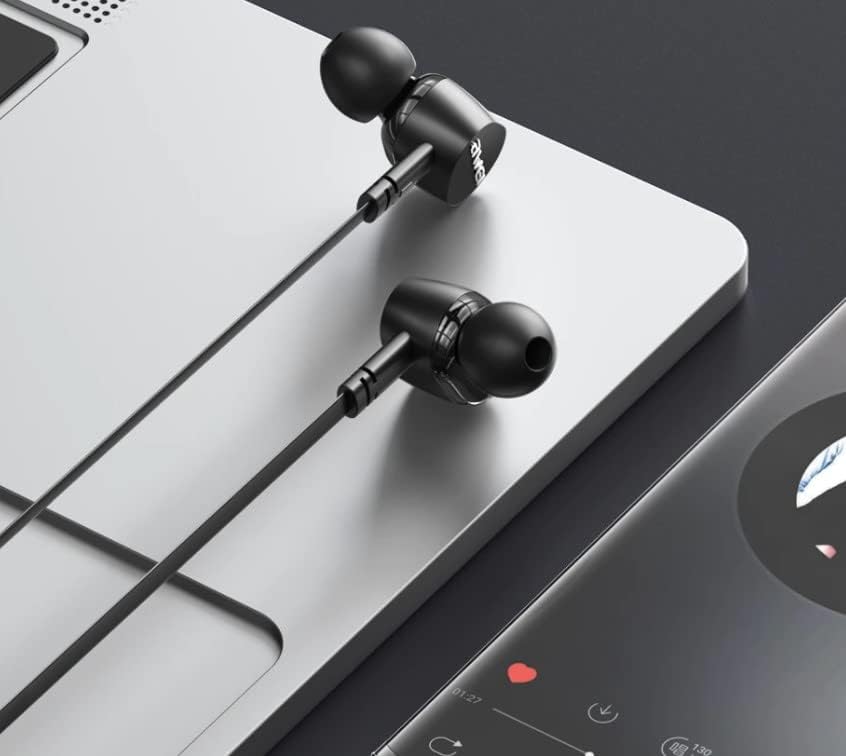
Umfanekiso 4.1: The earphones are compatible with various devices featuring a USB-C port, such as laptops and smartphones.
5. Imiyalelo yokusebenza
The Awei TC-7 earphones feature an inline remote with buttons for convenient control of your audio and calls.
5.1. Ulawulo lokudlala umculo
- Dlala/Misa: Cofa iqhosha eliphakathi kube kanye.
- Ingoma elandelayo: Cinezela iqhosha eliphakathi kabini ngokukhawuleza.
- Umkhondo wangaphambili: Cinezela iqhosha eliphakathi kathathu ngokukhawuleza.
- Ukunyusa ivolumu: Cinezela iqhosha '+'.
- IVolumu esezantsi: Cofa iqhosha '-'.
5.2. Ulawulo lweeFowuni
- Phendula/Cima umnxeba: Cinezela iqhosha eliphakathi kube kanye ngexesha lomnxeba ongenayo okanye xa kukho umnxeba osebenzayo.
- Yala umnxeba: Cinezela uze ubambe iqhosha eliphakathi kangangemizuzwana emi-2 ngexesha lomnxeba ongenayo.
6. Isondlo
Proper care will extend the lifespan of your Awei TC-7 earphones.
- Ukucoca iiCushions zendlebe: Regularly remove the ear cushions and clean them with a soft, damp ilaphu. Qinisekisa ukuba zomile ngokupheleleyo phambi kokuba uzidibanise.
- Ukhathalelo lwekhebula: The cable is designed to be tangle-free. Avoid excessive pulling or sharp bending to prevent internal damage.
- Ugcino: When not in use, store the earphones in a clean, dry place, away from extreme temperatures.
- Ukumelana naManzi: The earphones are rated as waterproof. However, avoid prolonged submersion and ensure the USB-C port is dry before connecting to a device after exposure to water.
7. Ukuxazulula ingxaki
If you encounter issues with your Awei TC-7 earphones, please refer to the following common solutions:
| Ingxaki | Unobangela Onokwenzeka | Isisombululo |
|---|---|---|
| Akukho sandi siphuma kwi-earphones | Earphones not properly connected; device volume too low; incorrect audio output setting on device. | Ensure the USB-C plug is fully inserted. Increase device volume. Check device audio settings to confirm output is set to earphones. |
| Imakrofoni ayisebenzi | Microphone port blocked; incorrect input setting on device; application permissions. | Ensure the microphone area is clear. Check device sound settings for microphone input. Verify application permissions for microphone access. |
| Amaqhosha akaphenduli | Loose connection; device incompatibility; software glitch. | Reconnect the earphones. Test with another compatible device if possible. Restart your device. |
8. Iinkcukacha
| Uphawu | Iinkcukacha |
|---|---|
| Igama loMfanekiso | EA-7 |
| Itekhnoloji yoQhagamshelwano | Intambo |
| UJack weHeadphone | USB-C |
| Ukubekwa kwendlebe | Endlebeni |
| Uluhlu lokuphindaphinda | 20Hz - 20kHz |
| Iimpawu ezongezelelweyo | Microphone Included, Inline Control |
| Izinto eziphathekayo | Iplastiki |
| Inqanaba lokuchasa amanzi | Into evikela amanzi |
| Iimpawu zeCable | Tangle Free |
| Izixhobo ezihambelanayo | Smartphones, Laptops, Tablets, Desktops with USB-C |
9. Iwaranti kunye neNkxaso
Ngolwazi lwewaranti kunye nenkxaso yabathengi, nceda ubhekisele kumaxwebhu anikezelweyo kwindawo yokuthenga okanye uqhagamshelane nomthengisi wakho. Gcina ubungqina bakho bokuthenga kuwo nawaphi na amabango ewaranti.