
1. Intshayelelo
The MikroTik CSS610-8G-2S+IN is a Cloud Smart Switch designed for efficient network management. It features eight 1 Gigabit Ethernet ports and two 10 Gigabit SFP+ ports, offering versatile connectivity options for various network environments. This device operates on SwOS, a lightweight operating system optimized for switch functionality, providing an intuitive web-based interface for configuration and management. This manual provides essential information for the proper setup, operation, and maintenance of your CSS610-8G-2S+IN switch.
2. Ulwazi loKhuseleko
- Always disconnect the power adapter before cleaning or servicing the device.
- Qinisekisa ukungena komoya okufanelekileyo ukuthintela ukutshisa. Musa ukuvala ukuvuleka komoya.
- Use only the power adapter supplied with the device or a compatible replacement specified by MikroTik.
- Kuphephe ukubeka isixhobo emanzini, ukufuma, okanye ubushushu obugqithisileyo.
- Esi sixhobo senzelwe ukusetyenziswa kwangaphakathi kuphela.
- Musa ukuzama ukuvula okanye ukulungisa isixhobo ngokwakho. Thumela zonke iinkonzo kubasebenzi abaqeqeshiweyo.
3. Imixholo yePakethe
Qinisekisa ukuba zonke izinto zikhona kwiphakheji yakho:
- MikroTik CSS610-8G-2S+IN Cloud Smart Switch
- Power Adapter (12-57V DC)
- Isikhokelo sokuQalisa ngokukhawuleza
4. Hardware Overview
The CSS610-8G-2S+IN features a compact desktop case design with various ports and indicators for network connectivity and status monitoring.

Umfanekiso 4.1: I-engile ngaphambili view of the MikroTik CSS610-8G-2S+IN Cloud Smart Switch, showing the eight Gigabit Ethernet ports, two SFP+ ports, power input, and reset button.
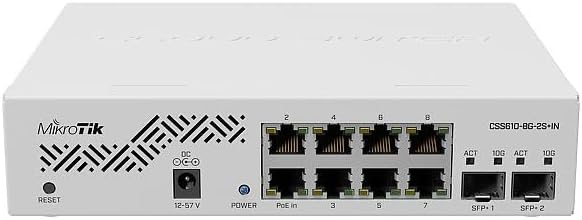
Umfanekiso 4.2: Phezulu view of the MikroTik CSS610-8G-2S+IN Cloud Smart Switch, highlighting the ventilation patterns and the MikroTik logo.

Umfanekiso 4.3: Ngasemva view of the MikroTik CSS610-8G-2S+IN Cloud Smart Switch, showing the Kensington lock slot and additional ventilation.
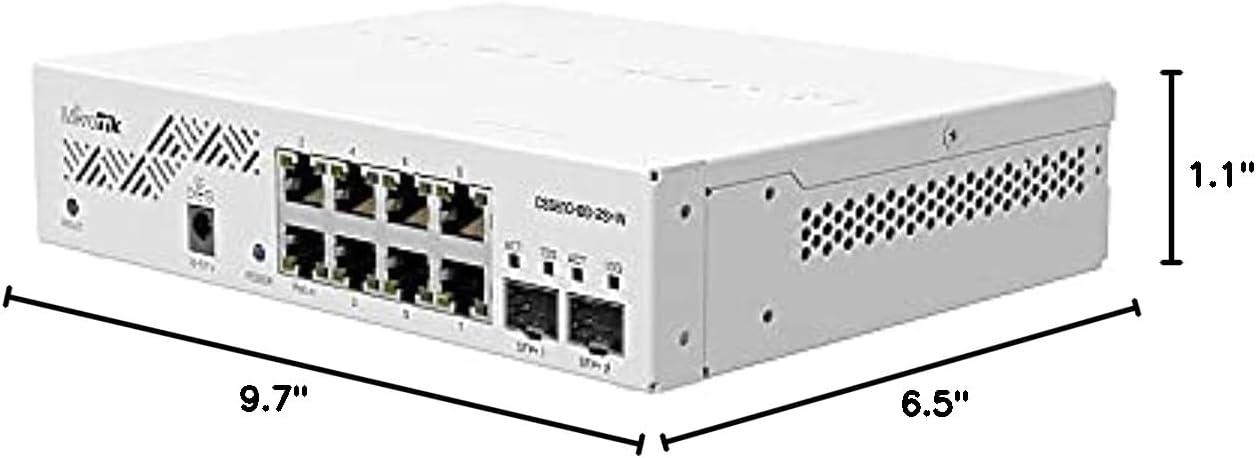
Umfanekiso 4.4: Ubukhulu view of the MikroTik CSS610-8G-2S+IN Cloud Smart Switch, indicating approximate measurements of 9.7 inches (length), 6.5 inches (width), and 1.1 inches (height).
4.1. Iphaneli yangaphambili
- Iizibuko ze-Ethernet (1-8): Eight 1 Gigabit Ethernet ports for connecting network devices. Each port has an associated LED indicator for link/activity status.
- SFP+ Ports (SFP+1, SFP+2): Two 10 Gigabit SFP+ cages for fiber optic or DAC cable connections. Each port has an associated LED indicator for link/activity status.
- Amandla e-LED: Ibonisa imeko yamandla esixhobo.
- Igalelo leDC: Power jack for connecting the external power adapter.
- Lungisa iqhosha: Used to reset the device to factory defaults or enter bootloader mode.
5. Seta
5.1. UQhagamshelwano loMzimba
- Connect your network devices (computers, servers, other switches) to the 1 Gigabit Ethernet ports (1-8) using standard Ethernet cables.
- For 10 Gigabit connectivity, insert compatible SFP or SFP+ modules (not included) into the SFP+1 and SFP+2 cages, then connect appropriate fiber optic or DAC cables.
- Connect the provided power adapter to the DC input jack on the switch and then plug the adapter into a power outlet. The Power LED will illuminate.
5.2. Initial Configuration (SwOS)
The CSS610-8G-2S+IN uses SwOS for management, which is accessible via a web umkhangeli zincwadi.
- Ensure your computer is connected to one of the switch's Ethernet ports.
- By default, the switch attempts to obtain an IP address via DHCP. If no DHCP server is available, it will fall back to a static IP address of
192.168.88.1. - Vula a web browser (e.g., Chrome, Firefox) and navigate to the switch's IP address. If using the fallback IP, enter
http://192.168.88.1. - Igama lomsebenzisi elihlala likhona ngu
adminand there is no password initially. Leave the password field blank and click 'Login'. - Upon first login, it is highly recommended to set a strong password for security.
5.3. Uhlaziyo lweFirmware
Regularly updating the firmware ensures optimal performance and security. It is recommended to update the firmware upon initial setup.
- Download the latest SwOS firmware for the CSS610-8G-2S+IN from the official MikroTik webindawo (mikrotik.com/download).
- Access the SwOS web interface as described in Section 5.2.
- Navigate to the 'Upgrade' tab.
- Layisha i-firmware ekhutshelweyo file and follow the on-screen instructions to initiate the update process. The switch will reboot after the update.
6. Ukusebenza
The SwOS interface provides comprehensive control over the switch's functions.
6.1. Basic Switch Functions
Through the SwOS web interface, you can configure various Layer 2 (L2) network features:
- Port-to-Port Forwarding: Control traffic flow between specific ports.
- Ulawulo lwesaqhwithi soSasazo: Prevent network congestion caused by excessive broadcast traffic.
- MAC Filters: Allow or deny network access based on MAC addresses.
- Uqwalaselo lweVLAN: Create and manage Virtual Local Area Networks for network segmentation.
- Traffic Mirroring: Duplicate network traffic from one port to another for monitoring and analysis.
- Bandwidth Limitation: Control the maximum data transfer rate for individual ports.
- MAC and IP Header Fields Adjustment: Advanced configuration options for network packets.
6.2. SwOS Interface Navigation
The SwOS interface is organized into several tabs, each dedicated to specific functionalities:
- Ikhonkco: Displays current link status, speed, and duplex mode for all ports.
- I-VLAN: Manages VLAN configurations, including VLAN ID, port membership, and taggingqa.
- Ugqithiso: Configures port isolation, broadcast storm control, and other forwarding rules.
- I-ACL: Access Control List for advanced traffic filtering.
- Inkqubo: General system settings, firmware upgrade, and device reboot options.
7. Isondlo
7.1. Ukucoca
To maintain optimal performance, periodically clean the device:
- Ensure the device is powered off and disconnected from all cables.
- Use a soft, dry cloth to wipe the exterior of the switch.
- For ventilation openings, use compressed air to remove dust buildup.
- Musa ukusebenzisa izicoci ezingamanzi okanye izinto ezirhabaxa.
7.2. Uhlaziyo lweFirmware
As mentioned in Section 5.3, regularly check the MikroTik website for new firmware versions to benefit from bug fixes, performance improvements, and new features.
7.3. Ukuqwalaselwa kokusingqongileyo
Operate the switch within its specified temperature and humidity ranges to ensure longevity and stable performance. Avoid placing the device near heat sources or in direct sunlight.
8. Ukuxazulula ingxaki
8.1. Imiba eqhelekileyo
- Akukho Mandla: Ensure the power adapter is securely connected to both the switch and a working power outlet. Check the Power LED.
- "Network cable unplugged" error: Verify that Ethernet cables are properly seated in both the switch and the connected device. Check the link/activity LEDs on the switch ports. Ensure the connected device's network adapter is enabled and drivers are up to date. An outdated switch firmware can also cause this; refer to Section 5.3 for firmware update instructions.
- Cannot access SwOS web ujongano: Confirm your computer's IP address is in the same subnet as the switch (e.g., if switch is 192.168.88.1, your computer should be 192.168.88.x, excluding .1). Try clearing your browser's cache or using an incognito window.
- Slow network performance: Check for excessive broadcast traffic (use SwOS monitoring tools), ensure correct duplex settings, and verify cable integrity.
8.2. Resetting to Factory Defaults
If you encounter persistent issues or forget the login password, you can reset the switch to its factory default settings:
- With the device powered on, press and hold the Reset button.
- Continue holding the button until the Power LED starts flashing.
- Release the button. The device will reboot with factory default settings.
9. Iinkcukacha
| Uphawu | Inkcazo |
|---|---|
| Inombolo yoMfanekiso | CSS610-8G-2S+IN |
| Izibuko ze-Ethernet | 8 x 1 Gigabit Ethernet |
| I-SFP + izibuko | 2 x 10 Gigabit SFP+ |
| Ukutshintsha Umthamo | 12 Gigabits Per Second (Data Transfer Rate) |
| Inkqubo yokwenza | SwOS |
| Ungeniso lwamandla | I-12-57V DC |
| Imilinganiselo (L x W x H) | 9.7" x 6.5" x 1.1" |
| Ubunzima bento | 10.6 ounces (300 grams) |
| Case Material | Iplastiki |
| Ubushushu bokusebenza | 60 Degrees Celsius (Upper Temperature Rating) |
10. Iwaranti kunye neNkxaso
MikroTik products are covered by a limited warranty. For detailed warranty information, technical support, and additional resources, please visit the official MikroTik webindawo:
When contacting support, please have your device's model number (CSS610-8G-2S+IN) and serial number ready.